Nivqerra
Pulse Guide
Pulse Guide
Couldn't load pickup availability
1. Problem Statement
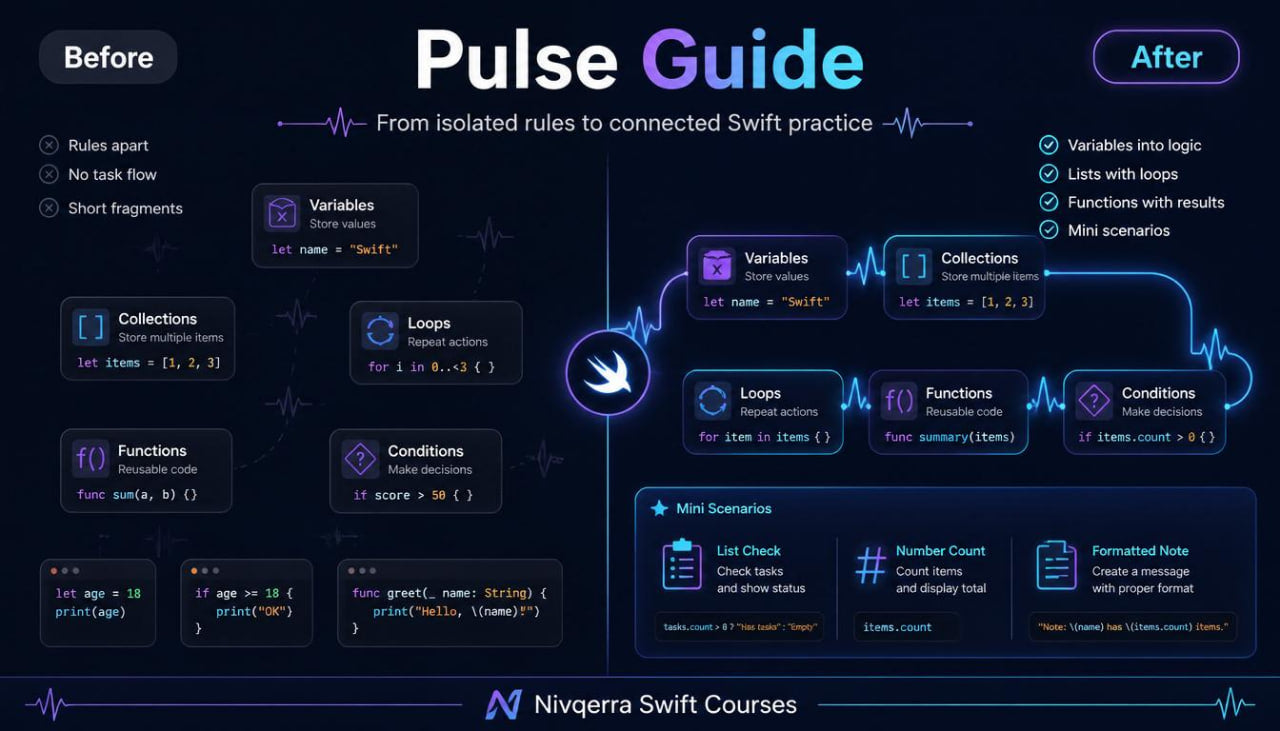
After studying the basic topics, a learner often faces a new challenge: separate structures are already familiar, but when creating a personal example, the question becomes how to put them together correctly. A learner may understand variables, conditions, loops, and functions separately, but not always see how they work inside one task. Another challenge appears when working with collections: the learner may know how to create a list but feel unsure when going through values, filtering data, or preparing a short result. Without sequential exercises, code may remain a set of separate commands rather than a readable structure. Pulse Guide was created so the learner can begin thinking not only in lines of code, but also in small logical blocks.
2. Solution
Pulse Guide presents Swift through practical learning situations where each topic is used together with others. The materials show how variables store data, how conditions guide decisions, how loops work with sets of values, and how functions help divide a task into neat parts. Lessons are built so the learner gradually moves from short examples to mini-scenarios: checking a list, handling numbers, formatting text, counting values, and preparing a simple report. Each module includes an explanation, code review, and exercises for independent work. This approach helps the learner see Swift’s inner logic and understand how several familiar tools form a complete fragment.
3. What’s Inside
Pulse Guide includes an expanded learning route that fits after the starting plans and moves the learner from basic syntax to more applied work. At the center of the plan is practical combination of functions, collections, conditions, loops, and simple data structures.
The first module reviews key topics from previous plans, but through short practical examples. The learner does not only review definitions of variables, conditions, and functions; they see how these ideas interact in small tasks. For example, a value is stored in a variable, passes a check, moves into a function, and is then used to form a result.
The second module develops work with collections. The learner works with lists of values, adds new elements, reads elements by position, checks data count, and compares different ways to store information. In this module, collections are not presented as a dry rule, but as a way to organize several related values in one place. Examples may include a list of study topics, a set of numbers, a group of text values, or a collection of simple records.
The third module focuses on loops together with collections. The learner sees how to go through values, perform a repeated action for each element, count totals, and skip data that does not match a condition. Special attention is given to reading a loop: where repetition begins, what changes at each step, when execution ends, and how the result can be used later.
The fourth module works with conditional logic in wider examples. It covers several types of checks, nested conditions, combinations of logical operators, and preparing different responses based on input data. The learner practices not only writing conditions, but also reading them as text logic: when data has one form, one path runs; when it has another, a different fragment starts.
The fifth module goes deeper into functions. The learner studies how to create functions for handling values, how to pass several parameters, how to return a result, and how to avoid overly long fragments. A separate part explains how a function name should describe its role, why parameter names should be readable, and how functions make learning code cleaner.
The sixth module is dedicated to mini-scenarios. These are small learning tasks where several previous topics are combined. For example, the learner may create a check for a list of numbers, count values that match a condition, prepare a text result, write a function for a repeated action, or divide one task into smaller parts. Each scenario includes an explanation, an example, and a task for review.
The seventh module contains a block on reading code written by someone else. The learner receives prepared fragments and gradually studies what happens inside them. This is an important part of the plan, because learning requires not only writing personal examples but also understanding existing fragments. The materials show how to move from the first line to the last, how to track variables, how to see the role of functions, and how to notice logical links.
The plan also includes practical exercises after each module, a short glossary of concepts, learning notes for review, and a topic schedule. The schedule helps divide the modules so the learner does not rush and can return to harder examples after the first pass.
4. Who is this for?
Pulse Guide is suitable for learners who already know the basics of Swift and want to move into more meaningful practice. This plan is for those who can read a simple code fragment but want to better understand how to build personal examples from several parts.
It also fits learners who have already worked with variables, conditions, functions, and loops but feel that the topics are not yet fully connected. Pulse Guide helps show how one topic supports another: functions work with data, collections store sets of values, loops handle those sets, and conditions guide execution paths.
This plan can be chosen after Axis Set when the learner wants more practical tasks and fewer isolated examples. It is also useful for review when previous study was built from scattered materials and lacked a calm structure.
5. What You’ll Learn
- How to combine variables, conditions, loops, and functions in one learning example.
- How to work with lists of values and read their structure.
- How to add, review, and check collection elements.
- How to use loops to go through data sets.
- How to count totals based on several values.
- How to create conditions with several execution paths.
- How to read nested conditions without losing the logic.
- How to create functions with several parameters.
- How to return a result from a function and use it later.
- How to divide one task into smaller parts.
- How to read prepared code and explain its work in your own words.
- How to build mini-scenarios based on familiar topics.
- How to use learning notes for reviewing harder fragments.
- How to prepare for plans where code structure and larger learning tasks receive more attention.
6. 30-day refund terms
For paid Nivqerra plans, a 30-day refund period applies according to the store rules and refund policy page. Pulse Guide is a paid plan, so before placing an order, the learner can review the refund terms, request review period, and request format.
This section should be presented transparently and without pressure. On the plan page, it is enough to state that refund requests are reviewed within 30 days after purchase according to the store policy. It is also useful to mention that the Nivqerra team handles requests through the official contact channel, while the detailed process is described on the refund policy page.
Self-paced learning overview
- 📁 Digital file available after purchase
- ♾️ Long-term availability
- 🔒 Secure checkout
- 🗓️ Content updated in 2026
Do I need previous Swift experience?
Do I need previous Swift experience?
No, some courses are suitable for the starting stage, while others are made for learners who already know basic ideas. Each plan presents the level gradually, so the learner can choose materials that match their current stage.
What format do the materials use?
What format do the materials use?
The courses include modules, lessons, explanations, examples, practical tasks, and learning resources. The materials are structured so learners can return to topics and review selected parts during study.
Can I study at my own pace?
Can I study at my own pace?
Yes, the materials can be completed without a strict schedule. You can spend time on topics, examples, and tasks according to your own routine.
Share