Nivqerra
Frame Module
Frame Module
Couldn't load pickup availability
1. Problem Statement
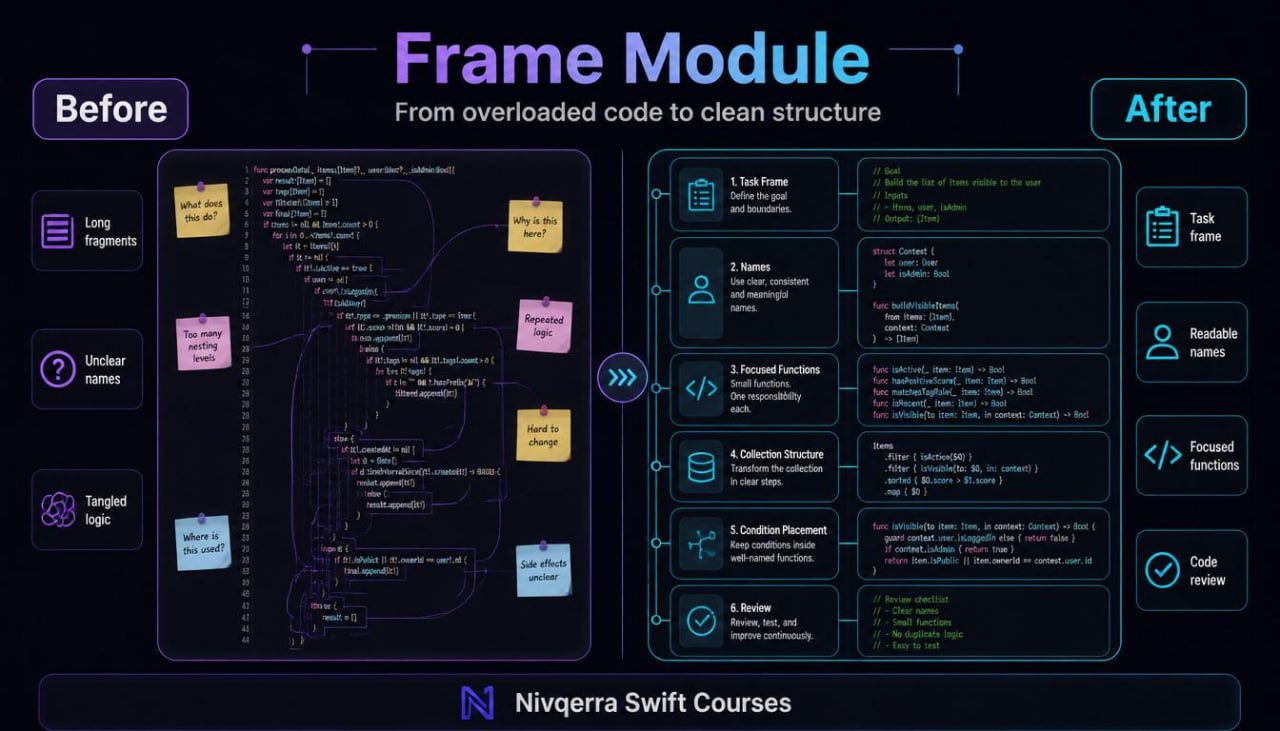
When a learner moves from short examples to larger Swift code fragments, a new challenge often appears: the code no longer consists of only a few lines, but has several connected parts. Because of this, it can be difficult to understand where the task begins, what data is needed, where the check happens, and which fragment prepares the result. Functions, conditions, loops, and collections may already be familiar, but without proper organization they can turn into a confusing sequence. A learner may write working examples, yet not always see how to make them readable and neat. Frame Module was created to help learners view code as a set of connected blocks, not as a long chain of commands.
2. Solution
Frame Module helps learners move from separate practical exercises to structured learning modules. The materials show how to divide a task into data preparation, checking, handling, result formation, and short logic review. Lessons explain how functions can take separate parts of a task, while collections can store related values in a readable form. The learner works with examples where code is gradually separated into parts and then brought back into a complete fragment. This approach helps the learner not simply write more lines, but better see the inner frame of a learning task.
3. What’s Inside
Frame Module includes a learning route built around Swift code structure. While previous plans introduced separate ideas and their combinations, this plan shows how to organize larger examples so they remain readable during study and review.
The first module focuses on the frame of a task. The learner studies what parts a learning example may include: input values, middle logic, checks, helper functions, the main fragment, and the final result. The materials explain why it is useful to describe a task in words before writing code. This approach helps show which parts are needed and which parts only make reading harder.
The second module focuses on naming. The learner studies how to name variables, functions, and collections so their role is clear at first glance. The module reviews examples of unclear names and ways to improve them. Special attention is given to how a name can describe an action, meaning, or purpose of a fragment.
The third module goes deeper into functions. The learner reviews functions that perform one specific action, functions with several parameters, and functions that return a handled value. Lessons show how to avoid placing too much logic inside one function. Instead of one long fragment, the learner studies how to create several smaller parts, each with its own role.
The fourth module is dedicated to collections in structured tasks. The learner works with lists of values, data groups, and sets that need to be checked, arranged by a simple rule, or prepared for further handling. The materials explain how a collection can be not just a set of values, but the central part of a task.
The fifth module reviews conditional logic in larger examples. The learner sees how to place conditions so they do not damage the general code structure. The module covers checks at the start of a fragment, checks inside a loop, and checks before forming a result. Lessons also show how too many nested conditions can make reading harder.
The sixth module contains practical learning mini-modules. These are tasks where the learner builds a fragment from several parts: preparing a list, checking values, handling data through functions, and forming a short text result. Each task has a description, structure review, code example, and a variation for independent practice.
The seventh module focuses on editing learning code. The learner takes a prepared fragment and gradually improves its structure: renaming variables, moving repeated parts into functions, removing extra lines, and adding short explanatory comments. This helps show that studying Swift is not only about writing new code, but also about careful work with an existing fragment.
The plan also includes short self-check lists. They help the learner evaluate whether a variable name is clear, whether a function has grown too large, whether a condition can be read without confusion, and whether the result location is understandable. In addition, there is a glossary of ideas and a study schedule for moving through the modules at a calm pace.
4. Who is this for?
Frame Module is suitable for learners who can already work with basic Swift structures but want to organize their own learning examples more clearly. This plan is for those who have already created small fragments with functions, conditions, loops, and collections, but feel that the code sometimes becomes confusing.
The plan is also useful for learners who want to read larger examples without losing the logic. When it is difficult to understand where data handling happens, why a function is placed in a certain location, or how conditions affect the result, Frame Module gives a calm route for studying these situations.
This plan fits well after Pulse Guide because it continues the topic of practical scenarios but focuses on structure. The learner moves from the question “how do I write a fragment?” to the question “how do I make the fragment readable for review and further work?”.
5. What You’ll Learn
- How to view a task as a set of connected parts.
- How to divide code into data preparation, checking, handling, and result.
- How to name variables, functions, and collections in a readable way.
- How to create functions with one clear role.
- How to pass data between functions and use returned values.
- How to work with collections in larger learning examples.
- How to place conditions so they do not overload the structure.
- How to combine loops, conditions, and functions in one fragment.
- How to edit prepared code and improve readability.
- How to add short comments where they truly help.
- How to find repeated parts and move them into separate functions.
- How to use self-check lists during review.
- How to prepare for plans with larger learning tasks.
6. 30-day refund terms
For paid Nivqerra plans, a 30-day refund period applies according to the store rules and the refund policy page. Frame Module is a paid plan, so before placing an order, the learner can review the request process, review period, and terms related to this plan.
On the plan page, this section should be presented without pressure or loud claims. It is enough to state that refund requests are reviewed within 30 days after purchase according to the store policy. The detailed process should be described on a separate page so the buyer can review the rules in advance.
Self-paced learning overview
- 📁 Digital file available after purchase
- ♾️ Long-term availability
- 🔒 Secure checkout
- 🗓️ Content updated in 2026
Do I need previous Swift experience?
Do I need previous Swift experience?
No, some courses are suitable for the starting stage, while others are made for learners who already know basic ideas. Each plan presents the level gradually, so the learner can choose materials that match their current stage.
What format do the materials use?
What format do the materials use?
The courses include modules, lessons, explanations, examples, practical tasks, and learning resources. The materials are structured so learners can return to topics and review selected parts during study.
Can I study at my own pace?
Can I study at my own pace?
Yes, the materials can be completed without a strict schedule. You can spend time on topics, examples, and tasks according to your own routine.
Share