Nivqerra
Flux Library
Flux Library
Couldn't load pickup availability
1. Problem Statement
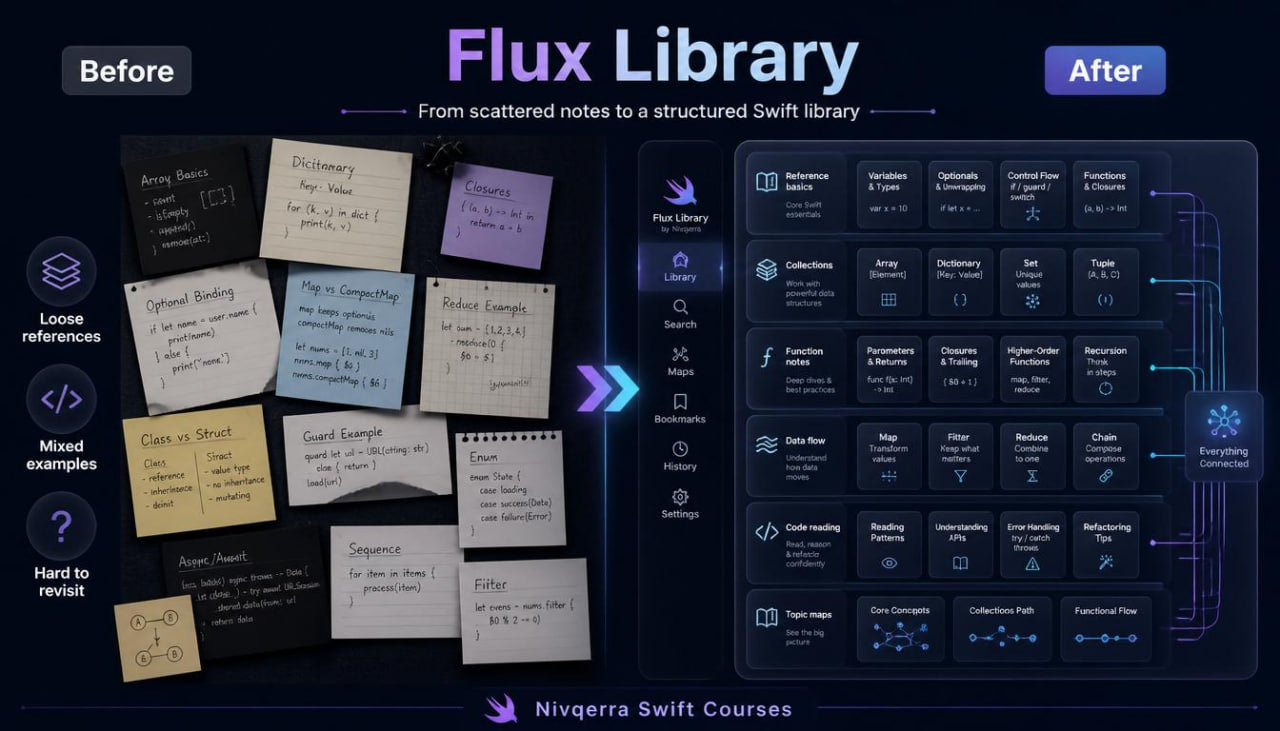
At the middle stage of study, a learner often has many separate pieces of knowledge, but not always a convenient system for review. Functions, collections, loops, conditions, and data types may feel familiar, yet while working on new examples, the learner may need to recall a rule, find a similar example, or compare several writing options. When materials are scattered, too much time goes into searching for the needed topic instead of practical work. Another challenge is that many exercises are not connected, so they do not create the feeling of a complete learning library. Flux Library was created to gather key Swift topics into an organized system with explanations, examples, exercises, and short reference blocks.
2. Solution
Flux Library gives the learner not just another set of lessons, but a structured learning library for working with basic and middle-stage Swift topics. The materials are divided by topic, so the learner may move through modules in sequence or return to selected blocks during review. The plan combines explanations, code examples, practical tasks, concept tables, short notes, and exercises for reading prepared fragments. Special attention is given to collections, functions, data handling logic, and ways to organize examples. This format helps the learner see Swift not as a set of random commands, but as a system of topics that can be gradually reviewed, compared, and used in learning tasks.
3. What’s Inside
Flux Library includes a wide selection of learning materials built as a topic library. Each module has its own role: some blocks explain ideas, others show examples, others offer exercises for independent work, while additional pages help review important concepts.
The first module is Swift Reference Basics. It gathers key ideas from previous plans: variables, constant values, data types, operators, conditions, loops, and functions. The materials are presented as short reference pages with examples. The learner can use this module as support while completing tasks.
The second module focuses on collections and value sets. It covers lists, data groups, adding elements, going through values, searching, checking count, and simple arranging. Examples show how collections help work not with one value, but with a whole group of related elements. The learner sees how a collection may become the base for calculation, text output, or checking.
The third module is functions as learning tools. In this block, functions are presented not only as a syntax structure, but as a way to divide a task into readable parts. The learner works with functions for checking values, counting, text formatting, list handling, and result preparation. Separate examples show how a long fragment is gradually divided into several shorter functions.
The fourth module focuses on data handling logic. The learner studies how data moves from an input value to a result: first it is stored, then checked, handled, passed into a function, and used further. Lessons show how to keep the logic readable when one example includes several variables, conditions, a loop, and a function.
The fifth module contains practical library exercises. This is a set of tasks that may be completed in sequence or used to review selected topics. The tasks cover list checking, value counting, short report creation, text work, element search, simple grouping, and reading prepared code fragments.
The sixth module focuses on reading and explaining code. The learner receives prepared examples and studies them part by part: what data is used, which functions are called, what the conditions check, how the loop works, and where the result is formed. After each example, there are self-check questions that help describe the logic in the learner’s own words.
The seventh module is learning notes and topic maps. It gathers short explanations, comparison tables, lists of common mistakes, and topic route diagrams. This block helps review material without reading every lesson from the beginning. The learner may use it before practical exercises or after completing a module.
The plan also includes a collection of mini-tasks for review, a glossary of terms, examples of readable naming, checklists for code structure review, and a learning route that shows how to move between blocks without chaotic jumps.
4. Who is this for?
Flux Library is suitable for learners who already have basic Swift knowledge and want to gather it into a convenient learning system. This plan is for those who can write short examples but want better orientation across topics, concept review, and a wider set of practical exercises.
It is also useful for learners who, after several plans, want an organized selection of explanations and examples at hand. If earlier study required searching for the needed topic across different notes, Flux Library helps gather the material into logical sections.
This plan fits well after Frame Module, because it continues work with structure while adding a wider reference section. The learner not only builds code fragments but also learns to use a personal study library: reviewing, comparing, checking, and gradually expanding practice.
5. What You’ll Learn
- How to use a learning topic library while working with Swift.
- How to review variables, data types, conditions, loops, and functions through short reference blocks.
- How to work with lists and value groups in practical tasks.
- How to go through, check, add, and arrange collection elements.
- How to create functions for checking, counting, formatting, and data handling.
- How to divide a longer fragment into several shorter functions.
- How to follow data from the starting value to the result.
- How to read prepared code and explain its logic in your own words.
- How to use tables, notes, and topic maps for review.
- How to find common mistakes in learning examples.
- How to create short reports based on value sets.
- How to prepare for plans with wider learning tasks and more complex code organization.
6. 30-day refund terms
For paid Nivqerra plans, a 30-day refund period applies according to the store rules and refund policy page. Flux Library is a paid plan, so before placing an order, the learner can review the request process, review period, and terms related to this plan.
On the plan page, this section should be written in a neutral and transparent way. It is enough to state that refund requests are reviewed within 30 days after purchase according to the store policy. Detailed steps should be described on a separate page, so the buyer can review the rules and request format in advance.
Self-paced learning overview
- 📁 Digital file available after purchase
- ♾️ Long-term availability
- 🔒 Secure checkout
- 🗓️ Content updated in 2026
Do I need previous Swift experience?
Do I need previous Swift experience?
No, some courses are suitable for the starting stage, while others are made for learners who already know basic ideas. Each plan presents the level gradually, so the learner can choose materials that match their current stage.
What format do the materials use?
What format do the materials use?
The courses include modules, lessons, explanations, examples, practical tasks, and learning resources. The materials are structured so learners can return to topics and review selected parts during study.
Can I study at my own pace?
Can I study at my own pace?
Yes, the materials can be completed without a strict schedule. You can spend time on topics, examples, and tasks according to your own routine.
Share